Portal filter classification

Introduction
Parts can have statuses that are well understood in practice, such as obsolete, EOL, NRND (not recommended for new designs), but the reporting of these statuses from vendor APIs is inconsistent. Some APIs do not report these at all and those that do can vary as there is no standard for them, or at least not one that we can rely on to be implemented consistently across different vendor APIs. Furthermore some APIs provide a variety of additional information, such as warehouse locations, ROHS compliancy and more. Some of this information might be useful in a quoting context.
To address this, in the QuoteArchitect version 4 (Norway) we have introduced a filter classification system that operates in a similar manner to the existing package classification mechanism. When prices are received from a portal, fields that have been identified as filter fields, or fields that are previously unknown (some APIs provide status values in undocumented fields that are not always included) will be listed in the CISAdmin portal definition as shown here.
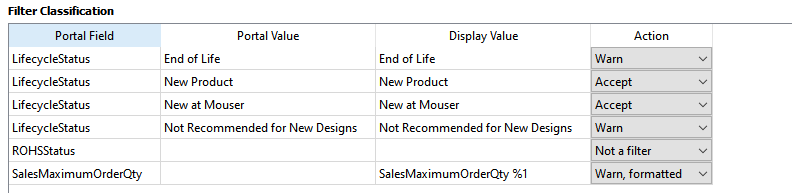
Newly discovered values will have an action of ???Not specified???. The user must chose an appropriate action to be taken for prices received with this status. An optional display name can also be set to be shown where ever this status is visible
Table fields
Portal Field. The data field received from the portal.
Portal Value. The data value received from the portal. Not shown for singleton actions (see below).
Display Value. An optional alternate value to be shown to the end user in place of the portal value. Not shown for “not a status” actions.
Action. The action to be performed when a matching entry is received.
Actions
Not specified. Indicates a field / value combination that has been received from the portal but not yet assigned an action. While there are any not specified actions a portal is blocked so an appropriate user must select appropriate actions.
Discard. Prices for this field / value combination are ignored and will not be seen in the part costs view. This might be useful for example for obsolete parts. It is not essential to discard such entries, it might in some cases be appropriate to use a warn action to bring this status to the user’s attention.
Warn. Prices for this field / value combination are accepted and an offer created in the part costs view, with a warning status. The warning text is the display value shown in the table as per this example.
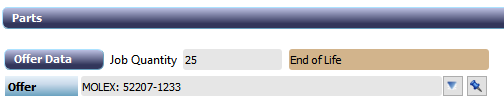
Warn formatted. Prices for this named field are accepted and an offer created in the part costs view, with a warning status. The warning text is created from the display value and the portal value. If display value contains the placeholder token %1 then this is replaced by the portal value, otherwise the warning text is
<display value>: <portal value>
The example shown here uses the placeholder formatting approach.


Accept. Prices for this field / value combination are accepted and an offer created with no additional processing for this field.
Not a filter. Indicates that this named field does not represent a value we are interested and all instances of this field regardless of it’s content are disregarded i.e. the entry will be accepted subject to any other defined rules that might apply. Known fields are filtered out automatically, but in the example here the field LeadTime has been intentionally retained for illustration.

Singletons
A singleton action is one that applies to all instances of a named field regardless of the value it holds, as opposed to a regular action which acts on a specific combination of field name and data value. The actions “not a status” and “warn, formatted” are singletons. When a singleton action is selected other instances of that field name are removed from the CISAdmin status classification editor.
Multiple actions
Where multiple actions are selected for a single received portal response the one listed earliest in the actions section above is selected.