CIS Search Options
The BOMArchitect CIS search engine has a number of useful features described here.
Simple search
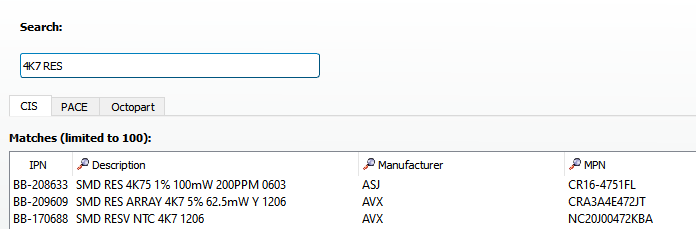
A simple search looks for entries that have all the entered tokens anywhere in the selected search columns. A search column is shown with the magnifying glass in the title bar. In the example below only items containing both 4K7 and RES are shown. Note that the matching acts on partial strings, so 4K75 and RESV are included.
Exact match
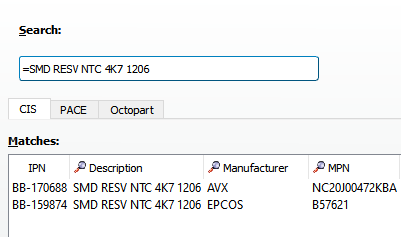
Prefixing the search string with the equal symbol denotes an exact match. Only entries having an exact match with the whole of the entered search string are shown.
Attribute search
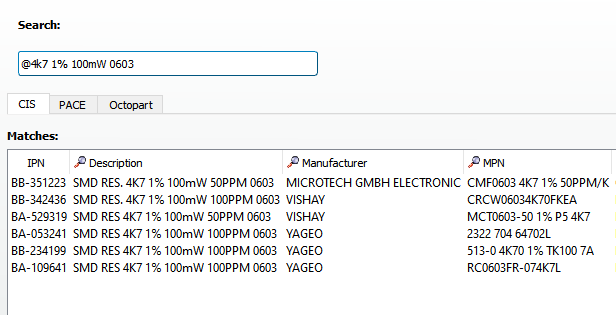
Prefixing the search string with the at symbol indicates an attribute search. The the key attributes are value, rating and tolerance. Any token in the search string and the CIS description field that has a valid format for an attribute is taken as such. E.g. 4K7 is recognised as the value for a resistor, 1% is recognised as a tolerance, 100mW as a power rating and 10V as a voltage rating. All three attributes must be entered. Any addition tokens, e.g. the shape code in the example below are processed in the same way as for a simple search. In this example unwanted results such as 4K75 are excluded.
Equivalence search
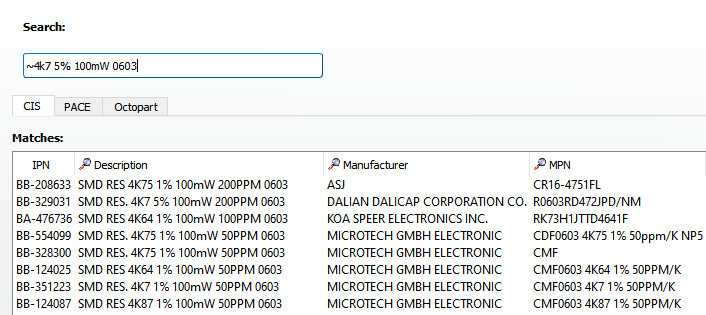
Prefixing the search string with the tilde symbol indicates an equivalence search. An equivalence search works in a similar manner to an attribute search, except that parts are equivalent but better are matched. A part with a rating higher than that specified is matched. A part with a value that at its maximum tolerance is within the tolerance specified in the search string is also matched.
In the example below we require a power rating of 100mW, note a part with a 250 mW rating is matched. NB, unlike all other tokens used in searching the power field is case sensitive.
We also search for a value of 4.7kΩ ± 5% (4,465 – 5,170 Ω). The first item matched is 4.75kΩ ± 1% (4,703- 4,796). As this part’s value range is entirely within the search range the part is accepted as equivalent.
Attribute format rules
The attributes used in attribute and equivalence searches must be formatted as described here.
Resistance. 1 or more digits followed by a multiplier code (R,K,M) then 0 or more digits. Examples:-
4K7
1M
Tolerance. 1 or more digits followed by %. Example:-
10%
Power. 1 or more digits followed by the units (mW, W, kW, MW). Examples:-
100mW
1W
1kW
Version 4 changes
Version 4, has the following changes for attribute and equivalence searches.
Capacitors are supported. Voltage ratings can be specified as V or kV.
Fractional notation eg 4.7K are supported in addition to 4E7, 4700 etc.
Only the value is required for such searches, although without a tolerance equivalence searches are not really useful.